

As in all my posts, there may be affiliate links. However, ClearPlay et. all did not sponsor or pay for this post in any way – I just love the services.
As parents, one of our main jobs is to protect our family. We protect our kids from germs and sickness to the best of our ability by cleaning the house, teaching them to wash their hands when they get home from being out and about, teaching them about hygiene, etc. We protect them from physical dangers by telling them not to touch the stove and showing them why, by telling them not to talk to strangers, etc.
Just the basics!
One often neglected place where we don’t remember to protect our kids to the best of our abilities is online.
Why Even Good Websites Aren’t Safe
I remember going on a popular homeschool blog to load our morning time plans when the kids were little. Unbeknownst to me, it had been hacked! There were *ahem* super bad images plastered there on the page! I quickly turned it to a different tab, glad that my kids didn’t see.
Even if we are going to decidedly Good Things online, we cannot be too careful. Decidedly joy-killing stuff when we should be filling our kids with joy.
Yet, there are simple steps you can take to protect your family from things and fortify your home.
As a Millennial parent, when computers and the internet were new, it all felt innocent and exciting. Napster let you record movie quotes to play on your Tracfone answering machine to give friends a laugh! MySpace let you post silly personality quizzes to see which ‘N Sync boy you “were,” and the like. The LOLCats came around and we all hadz cheezeburgerz. We tend to see the internet as something fun, irreverent, and silly, inhabited by friendly nerds. That feeling stuck with me, rubber stamping how I feel about the internet in general, and is hard to shake sometimes.

Point being, as parents, we expect that if we teach our kids that Bad is Bad, that they will avoid it online. However, we are not counting on the fact that even if they are not actively seeking evil online, it is seeking them.
Router-Level Internet Filtering: The Protection You Actually Need
CleanBrowsing is one of the best tools out there! Many times, non-techie parents make the mistake of thinking they installed a browser extension to keep ads or junk off, so therefore they are protected. This is not the case.
Browser extensions are finicky at best and easy to remove, at worst. They get removed accidentally with updates. They turn themselves off when you need them. They don’t have the coverage you expect them to have. And, in addition, they are likely to steal your browsing data and sell it – not fun.
Plus, you forget which computers you added extension protection to… Or get a new gadget in the house and forget to sync it. Too complicated and too unreliable.
CleanBrowsing protects at the router level. For those of you who are not extreme Star Trek nerds, the internet comes into your house from an ISP (Internet Service Provider) like Suddenlink, Optimum, etc. to your modem. The modem connects to a router.
The router is like a sun that shoots sunrays of internet light to all your gadgets in the house.

CleanBrowsing acts like sunscreen, going into the router and making sure that all gadgets connected to the router get filtered even before that internet goes to your iPad, etc. It is easier to lockdown, control, monitor, and is much more simple to operate than juggling all those filters on separate gadgets.
For gadgets with data plans or hotspot capability, CleanBrowsing has an app that you can add directly to those devices to make sure they are covered with your plan on the go!
Before you worry about it, yes, they have a free plan! You can have a paid plan that is very reasonable in which you can customize things. I’ve customized blocks on various providers that like to make popup ads on our Roku, which is nice, but not super necessary.
Layering Your Family’s Online Protection
In addition to CleanBrowsing, we use Nighthawk Parental Controls on our router to control times and what gadgets are actually accessing our internet, as well as Google Family Link, for safe searching and app controls. Just for good measure, we also use Qustodio on some devices!
The main thing you should have is something like CleanBrowsing to protect not only from pornography (whether intentional or inadvertent in things like hacked sites, ads, etc.) but also just from junk hitting your computer.
The amount of random sites lagging onto your browsing would astound you. Cut those off!
Movie Filtering for Family Movie Night: VidAngel and ClearPlay
In addition to that, we use VidAngel and ClearPlay for movies. These two apps allow you to remove language, inappropriate scenes, violence, and such from movies. The cuts are at your discretion. Many times, you can’t even notice the cuts in the movies!
Some people feel that kids need to be exposed to bad language and violence in media so that they can be ready for Real Life as Adults.
I’m strongly opposed to this.
As an Adult in Real Life, I don’t go around hearing tons of cursing or having random acts of violence popping up in my path on a daily basis. Again, I don’t shop at Walmart! But… (Ok, that’s a joke…)
Besides, as adults, we cultivate the life we want to live. If your ideal life doesn’t have bad language in it, you are in charge of that. You can take steps to avoid it as much as possible.
“Go confidently in the direction of your dreams! Live the life you’ve imagined. As you simplify your life, the laws of the universe will be simpler.”
~Henry David Thoreau
If you want a simple life surrounded by daily Bible reading and Jesus-centric music, do it. Joy will follow.
Watching movies with cursing puts the words in your brain and makes you more readily apt to use them, either verbally or in your brain. It also stunts your vocabulary and makes you sound less intelligent.
My husband and I routinely ClearPlay and VidAngel things we want to watch, even on our own. Yes, without the kids around!
Before you wonder, but why watch things that need to be censored at all – that is a fair point, but there are some amazing movies – I was a Theatre/Communication double major with English Literature and also took extensive film studies classes in grad. school, give me a break here – that are amazing art but don’t need a few extra scenes or words that are added on top for no reason.
Due to my background, I’m not talking about being Amish or prudish. I’m the first to tell you that I’d rather go without lots and lots of things then lose my Spotify plan! But, we can still control our environment in such a way as to cultivate joy in our Spirits.
Marvel movies are a great example. Iron Man is one of my favorite movies of all time and I wanted to show it to the kids. It teaches that caring about others and being self sacrificing (and being really good at science!) can help one to be a better person and beat the odds!
However, I didn’t need the random bad words and dancing bikini chicks there at the beginning, before Tony’s redemption, highlighting his bad boy-ness that he activates hero mode there near the middle of the movie. His snarkiness alone communicates that just fine without them!

Classic films like ET have tons and tons of language – and insults that I don’t need my little parrots mimicking! You may not remember that, because if like me, you saw it on TV when they used to take these things out, but it is still an amazing movie without it. Same goes for Back to the Future.
Here is what it looks like to use Clearplay, for instance.
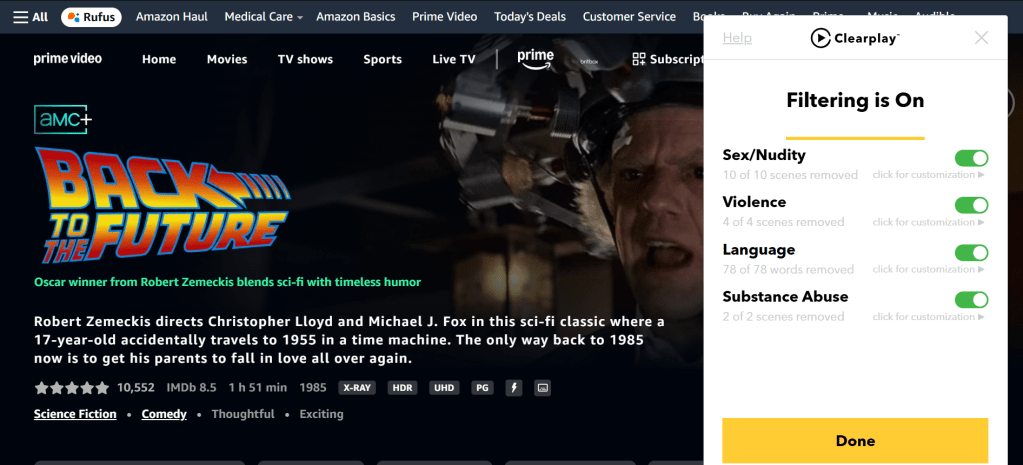
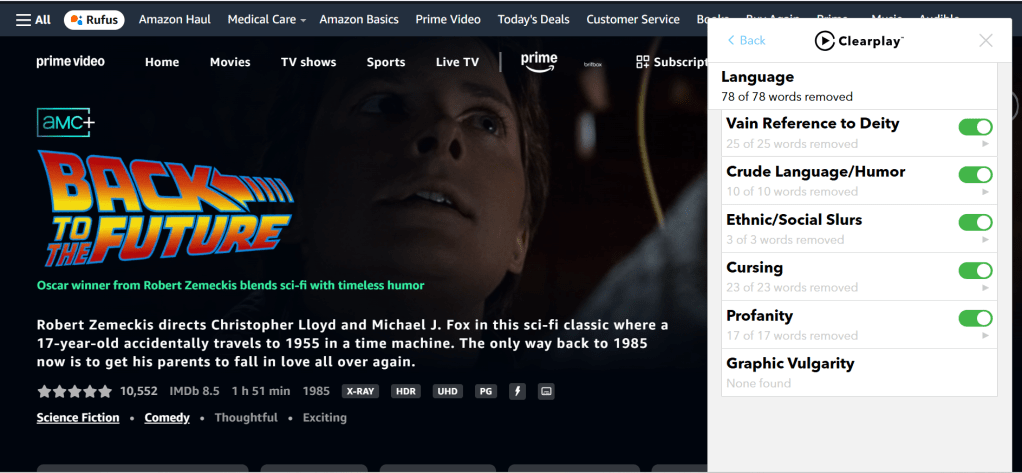
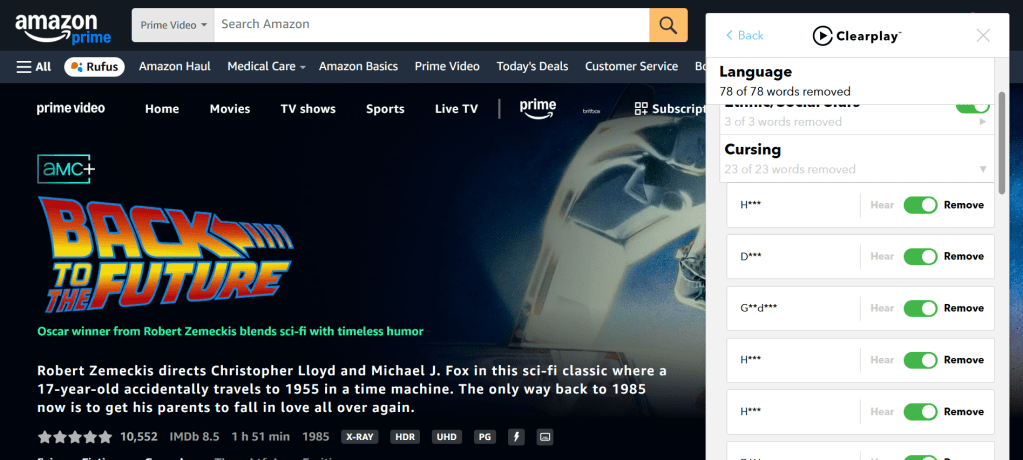
And for some of us, there are films we saw when we were in high school or so, that we may want to share with a spouse that are brilliant – looking at you, Wes Anderson!! – but have way too many things that we don’t want in our brains anymore. Like millions of repeated bad words, which really don’t even make sense in the context of the sentences they are used in.

My mom once told me that using the same bad word over and over again just makes you sound like you don’t have the imagination to think up a new adjective or word to use. Like, if we replaced a bad word with the word “pink” to describe a pony.
Would you sound smart if you said, “That pink pink pink pinkin’ pinkerty pinkest pink pony!!!”
Right, you would not sound smart. Case in point!
At a certain point, those things become undesirable. I used to have a giant Ignore button in my brain that things wouldn’t register. That is bad! You want your conscience to care. You don’t want to dull your senses. Now, I feel a magnetic revulsion from anything too violent or with too much language.
When my kids were little and all we watched was Mr. Rogers, Wild Kratts, the Wiggles, and the Wonder Pets, my spirit got sensitized again and I don’t want it to go back to the way it was when I was completely fine and dandy with going to Air Force One at the movie theatre as a kid.
The way to do that is to watch what you yourself watch.
How to Use VidAngel and ClearPlay
Using VidAngel or ClearPlay is easy!
VidAngel has Psych (which isn’t too violent generally but does have lots of random words popping up!) while ClearPlay has Marvel and more Disney movies.
What we do is have them on a Chrome extension and then send them to our Roku via wireless connection. We don’t have a TV, only a projector, but it is even easier to do if you have a more simple set up. Sometimes for more special effects laden movies, we hook up the HDMI to a laptop since the RAM suffers with heavy CGI.
Protecting Your Family Is Simple
You don’t need to be a tech genius to keep your family safe online. Start with router-level filtering through CleanBrowsing, add movie filtering tools like VidAngel or ClearPlay, and layer on additional parental controls as needed for your family.
The internet doesn’t have to be a scary place.
With a few simple tools, you can create a joyful, protected digital environment where your kids can learn, explore, and grow without stumbling into things that steal their innocence.
If you’d like to create a specialized plan for your home’s internet and media or need help knowing where to start or how to set it up, set up a coaching session with me! I’d love to help you in any way I can.










 Homeschool With Joy